Operational dashboards
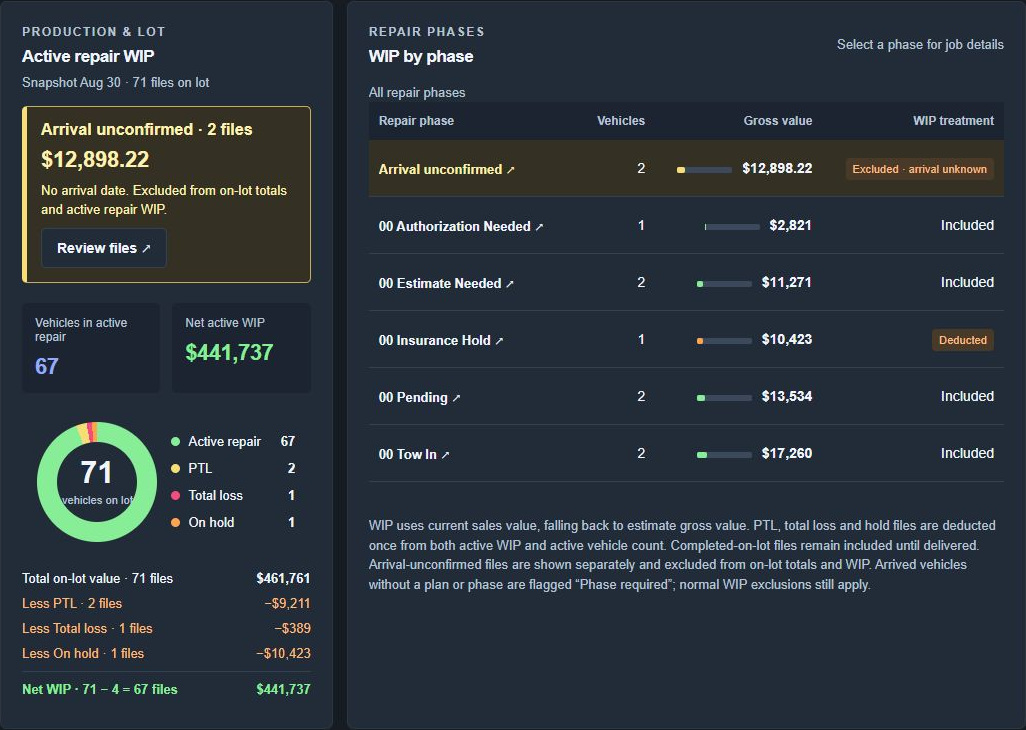
Bring relevant records into a focused view of performance, open work, missing information, and exceptions that need review.
Practical business support
When your workflow needs more than a spreadsheet, a focused business app can help. OPSFix Studio designs custom tools and operational dashboards around your team, your available data, and the decisions you need to make.
A few sentences are enough. Scope and price are agreed before work begins.
Where we can help
Bring relevant records into a focused view of performance, open work, missing information, and exceptions that need review.
Design job trackers, administrative tools, and guided steps around the people doing the work and the information they need.
Assess available exports and interfaces, then agree on a practical way to move or summarize information across systems.
A clear deliverable
Tell us where work gets stuck and which systems hold the information. We identify the users, data sources, permissions, and decisions the tool needs to support. A larger or uncertain project may start with separately agreed paid discovery.
Integrations depend on access to suitable data and supported interfaces. Hosting, third-party fees, security requirements, and ongoing support are clarified as part of the scope.
See how we agree on the workOne possible application
In a repair shop, work may be waiting on a part, an approval, or a supplier response. A focused app could connect status and follow-up information so the team knows what to review next.
Explore operational dashboard examplesBefore we start
Not necessarily. A focused tool may work with existing reports, exports, or available interfaces. We first check what is possible with your current systems.
That depends on the source systems and available access. The scope states whether updates use an import, a scheduled connection, or another agreed method, and how current the information will be.
Yes. Where practical, we define a useful first version around one workflow or a limited set of questions. Further features are separate decisions.
Testing, documentation, and handoff are included as agreed. Optional ongoing support can cover changes and maintenance, with responsibilities and availability defined separately.
A practical place to start
No technical brief or meeting required.